|
| Â |
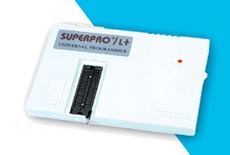
Xeltek SuperPro L+ 48-pin Universal Programmer (Parallel Port) |
 |
|
 |
|
|
| Â |
The Superpro L+ is a low-cost Universal Programmer supporting over 3,900+ devices including
many popular (E)EPROMs, FLASH, CPLDs, GALs and Microcontrollers. The programmer features
a 48-pin Zero Insertion Force (ZIF) socket allowing it to support any device up to 48 pins in
Dual-in-line (DIL) package.
Support is offered for the popular 8051 and Microchip PIC microcontrollers making this programmer
ideal for microcontroller development. The Superpro L+ programmer connects to the PC Parallel
(LPT) port yielding very fast data transfer speeds. The software is powerful and yet easy-to-use and
support all the standard programming operations.
DISCONTINUED PRODUCT
|
| Â |
|
|
|
 |
PC Driver Software |
|
- File: Load and save file in binary, Intel (extended) Hex, Motorola S or Tektronics (extended) Hex format. Multiple load, format conversion, relocation etc...
-
DOS shell, Change directory, Print, Quit
-
Buffer: HEX-ASCII Edit, Fuse Map Edit, Checksum, Swap, Vector Table edit
-
Select: Bidirectional search device by device name or by manufacturer name
-
Device: Blank Check, Read, Program, Verify, Security, Fuse, Erase, Word format select and funtions related to specific device
-
Test: TTL/CMOS Test, Memory Test, Vector Test, Test Pattern Edit, Auto Identify TTL/CMOS Device
-
Others: Macro, Options, Environment etc...
-
This shoftware is designed to work with Windows 98, ME and 2000. Correct operation on Windows XP is possible but is not guaranteed.
|
|
Device Support |
|
- Supports 3,900+ devices, including most E(E)PROM,Series E(E)PROM. FLASH
-
GAL, EP3xx/6xx/9xx, PEEL, PALCE, PLUS, PLS, PLH, PLC, ATV, ATF, CPL, 85Cxxx, 5Cxxx, DS12xx
-
Microcontrollers 87xx / 89xx / Z86Exx / TMS320xxx / D77Pxx / D78Pxx / PD75xxx / HD6370xxx / PIC16Cxx/17Cxx, and PSD3XX
-
Please note: The Device Support list for this programmer is fixed. New devices will not be added in the future.
|
|
Hardware Features |
|
- Connects to PC via PC Printer Port (LPT) Interfaces (parallel communication, uses address 278H,378H, 3BCH)
-
Easy interface to LAPTOP, PC, PS/2 or compatibles
-
48-pin Zero Insertion force (ZIF) Socket
-
External mains power supply adaptor
-
High speed programming, cost-effective Hardware and Flexible Software
|
|
Device Update Policy |
|
- The Superpro L+ programmer is considered an entry product with basic support.
-
Device update is infrequent and there is no set schedule available. New devices will not be added in the future.
-
Please check the Device Support List and make sure the devices in your application are supported at present time
-
You (can get the latest software) may download the current software version free of charge - See the Downloads link
|
|
Hardware and Electrical Specification |
|
- PC Connection: Parallel Printer Port (LPT)
-
AC Adapter : Input AC 220V or 110V
-
Device socket : One 48 pin ZIF socket
-
Power supply : Input AC 100 to 240V , Output : DC 12V @ 1.5 Amp
-
Programmer Dimension : 7 3/4" L x 5 1/2" W x 3/4" H
-
Shipping Weight : 1.8 Kg
|
|
Feature Comparison with Superpro Z programmer |
|
|
The Superpro L+ programmer is the replacement programmer for the now discontinued Superpro Z programmer.
A comparison of these two programmers is detailed in the table below:
Ntr Phone Codes - Portable
For tech enthusiasts using emulation layers or running mobile debuggers, porting legacy Gateshark codes into a portable format requires specific memory region scanning. Using a mobile-adapted utility like a NTR Cheat Tool Engine allows developers to hook into portable software packages.
The most straightforward way to get Patron access is by redeeming a code. Each version of NTR Phone has had a corresponding unlock key. These codes are "portable" in the sense that you can enter them into your current version to get immediate access.
NTR CFW is a custom firmware layer for the Nintendo 3DS. It allows users to execute background plugins, take screenshots, stream video to a PC, and most importantly, apply real-time cheat codes. Unlike traditional hardware like Action Replay, NTR handles cheating entirely via software. The Role of Portable Phone Codes
If you have USB debugging enabled or connect via Wi-Fi ADB, you can push NTR commands remotely. A portable script (written in Python or shell) can send: ntr phone codes portable
Historically, managing cheat codes required a PC to download, format, and transfer .plg or txt cheat files to a MicroSD card. "Portable phone codes" methods bypass the PC entirely.
To move codes from your phone to your handheld device, use an FTP (File Transfer Protocol) setup:
: It currently requires a 64-bit device to run. For tech enthusiasts using emulation layers or running
The Nintendo 3DS remains one of the most beloved handheld consoles in gaming history. While its library is vast and engaging, seasoned players often look for ways to breathe new life into their favorite titles. Enter the world of setups—a specialized method that allows gamers to apply Action Replay-style cheat codes to 3DS games directly from their smartphones while on the move.
A truly "portable" solution means either finding a set of codes that behave similarly across platforms or using a software abstraction layer (third-party apps or scripts) that translates commands.
Connect your portable Android or mobile device to a file explorer tool, and browse to the application's local user data storage directory. Each version of NTR Phone has had a corresponding unlock key
In this folder, find a file named persistent_data . It will not have a visible file extension.
. Official game cartridges also bear codes beginning with "NTR" (e.g., "NTR-ADAE-USA" for Pokémon Diamond ) followed by a four-character game ID and a region code. NTR Custom Firmware (CFW) |  |
| Product Information |
| Xeltek SuperPro L+ 48-pin Universal Programmer (Parallel Port) |
| Xeltek |
|
XEL-SuperproL+ |
| Discontinued Product |
|
| Â |
|
| Â |
| Â |
|
| Â |
|
|
|
|
|